A short architectural write-up on building a sharded, in-memory key-value store with clean APIs and clear evolution paths.
Why LightShard?
LightShard started from a simple question:
What does it really take to go from a single in-memory map to a scalable key-value service?
While systems like Redis abstract away most internal complexity, LightShard was built to understand and design those internals explicitly — sharding, concurrency, APIs, and extensibility — without jumping straight into distributed consensus or persistence.
The goal was not to build a production replacement, but to design a system that mirrors real backend trade-offs.
The Core Problem
A single in-memory map has clear limits:
- bounded by a single CPU core
- bounded by process memory
- hard to scale reads/writes cleanly
LightShard addresses this by introducing explicit sharding, while remaining simple, predictable, and easy to reason about.
High-Level Architecture
At a high level, LightShard is a sharded, in-memory key-value store exposed over a gRPC API.
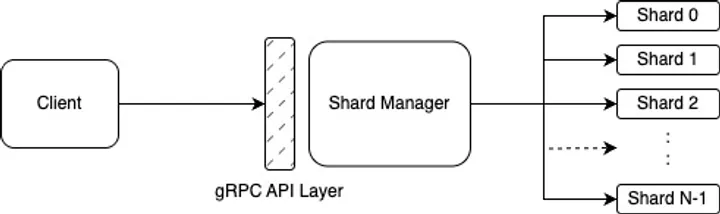
Figure 1: LightShard Architecture.
Each shard is an independent in-memory store responsible for a subset of keys.
Sharding Model
LightShard uses a simple hash-based sharding:
shard_id = hash(key) % NWhere:
N= number of shards- each shard owns its own data and lock
Why this matters:
- isolates contention to a shard
- enables parallel reads and writes
- keeps the implementation simple
This mirrors early-stage designs in many real systems before introducing consistent hashing or rebalancing.
Shard Internals
Each shard is intentionally minimal:
- in-memory map
- per-shard lock
- TTL (time to live) metadata per key
This ensures predictable behavior, easy reasoning about correctness, and a clear upgrade path.
TTL expiration is handled lazily on reads, which keeps the write path fast and avoids background sweeps in early versions.
API Design
LightShard exposes a clean gRPC interface:
SetSetWithTTLGetDeleteExistsTTL
The API is binary-safe (values as bytes), language-agnostic, and easy to embed into other systems.
This makes LightShard suitable as a building block, not just a standalone service.
Read & Write Flow
Write
- Client sends request via gRPC.
- Shard Manager hashes the key.
- Request routed to the correct shard.
- Shard applies the mutation in-memory.
Read
- Client sends
Get. - Shard Manager routes to the shard.
- Shard checks key + TTL.
- Value returned or rejected.
Why In-Memory First?
LightShard intentionally starts as an in-memory system because it simplifies correctness, highlights sharding trade-offs, and keeps latency extremely low.
Persistence is treated as an orthogonal concern, which allows LightShard to later integrate with a storage engine.
Key Takeaways
- Sharding is a design choice, not just a scaling trick.
- Explicit shard ownership simplifies concurrency.
- Clean APIs make systems composable.
LightShard represents the middle layer of a backend stack — sitting between application logic and storage engines.
Running LightShard via Docker
LightShard is published as a Docker image and can be run locally without building from source.
Pull the image
docker pull manojayyanavara/lightshard:latestRun LightShard
docker run -p 8982:8982 \
  -e GRPC_PORT=:8982 \
  manojayyanavara/lightshard:latest
This starts the LightShard gRPC server on port 8982.
You can now connect using any gRPC client (for example grpcurl, BloomRPC, or ezy) and interact with the key-value APIs.
Sample Requests using grpcurl
Below are example commands using grpcurl to interact with LightShard. These assume the server is running locally on port 8982.
Note:
valuefields are defined asbytesin protobuf. grpcurl accepts them as base64-encoded strings.
Set a key
grpcurl -plaintext \
  -d '{"key":"key1","value":"dmFsdWUx"}' \
localhost:8982 kvstore.KvStore/Set(dmFsdWUx = base64(“value1”))
Get a key
grpcurl -plaintext \
  -d '{"key":"key1"}' \
  localhost:8982 kvstore.KvStore/Get
Set a key with TTL (25 seconds)
grpcurl -plaintext \
  -d '{"key":"temp","value":"dGVtcHZhbA==","ttlSeconds":25}' \
  localhost:8982 kvstore.KvStore/SetWithTTL
Check TTL
grpcurl -plaintext \
  -d '{"key":"temp"}' \
  localhost:8982 kvstore.KvStore/TTL
Delete a key
grpcurl -plaintext \
  -d '{"key":"key1"}' \
  localhost:8982 kvstore.KvStore/Delete
Check existence
grpcurl -plaintext \
  -d '{"key":"key1"}' \
  localhost:8982 kvstore.KvStore/Exists